Setup · for owners
roomZy
Get started
Getting started — the setup checklist
A short checklist gets your facility live and taking bookings. Most of it lives under one place — Settings in the left menu — and each item has its own guide if you want the detail.
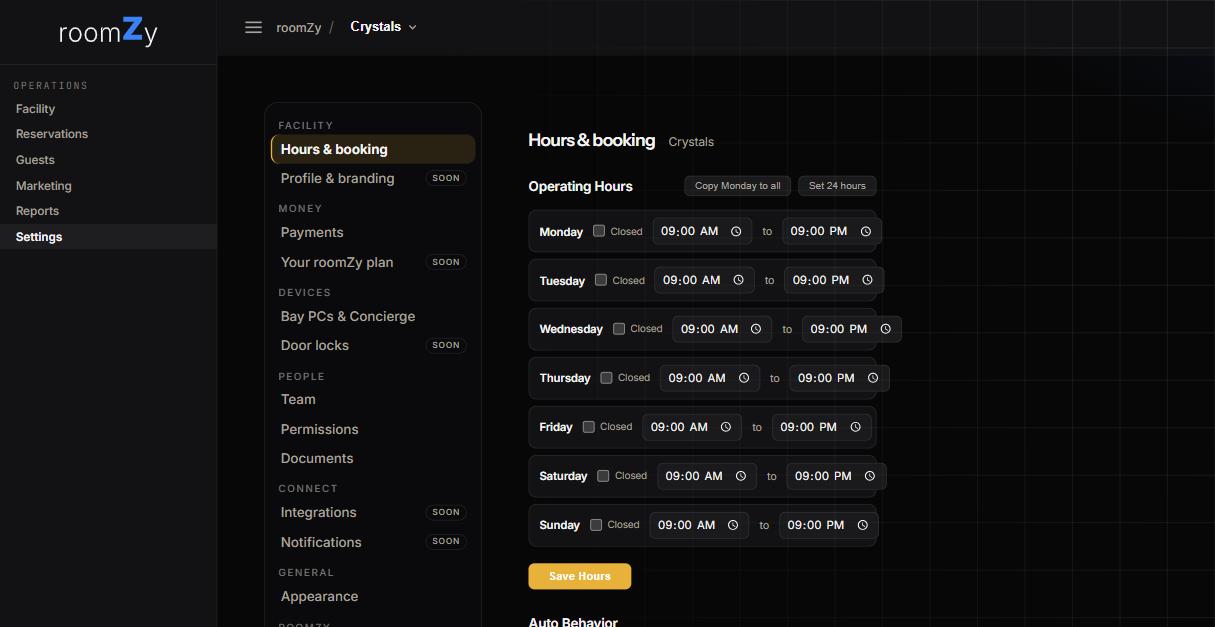
Settings — one home for hours, payments, devices, and your team.
The checklist
From Settings
- Set your hours. Settings → Hours & booking: your weekly schedule plus any closures. Guide
- Dress up your booking page. Settings → Profile & branding for your logo, accent colour, display name and tagline (they reach the booking pages, your e-mails and the Concierge popups). Bookable lengths are under Pricing & bay types; your website is on the same branding page. Share the page at app.roomzy.io/book/your-venue. Guide
- Price it. Settings → Pricing & bay types: your prices by length, a premium type for bays that differ, and extras like a swing analysis. Guide
- Turn on payments (optional). Settings → Payments: connect Stripe to take cards online, or run pay-at-the-desk. Guide
- Add your team. Settings → Team: invite front desk and managers so they can sign in.
- Set up your bays (optional). Settings → Concierge: install the on-screen host on each bay PC. Guide
- Connect your devices (optional). Settings → Apps & devices: your Kasa lights, your door lock, and a live health check of everything roomZy runs. Door lock guide
Hardware wiring — controllers, power, lighting, locks — is set up with roomZy, so it isn't on this list. Ask us and we'll handle it.
Then you're live
Day to day
- Run the floor from Facility — start & stop bays.
- Take walk-ins and calls on the Reservations screen — create a reservation.
- See who's coming back under Guests — managing guests.
- Watch how you're doing in Reports — reading reports.
roomZy
Questions? Email support@roomzy.io — we'll walk the first setup with you.