Starting or stopping a bay
The Facility screen is your live floor view — each bay with its status and a control to power it up or shut it down. Most of the time roomZy does this for you around bookings; this is for walk-ins and manual control.
Turn a bay on
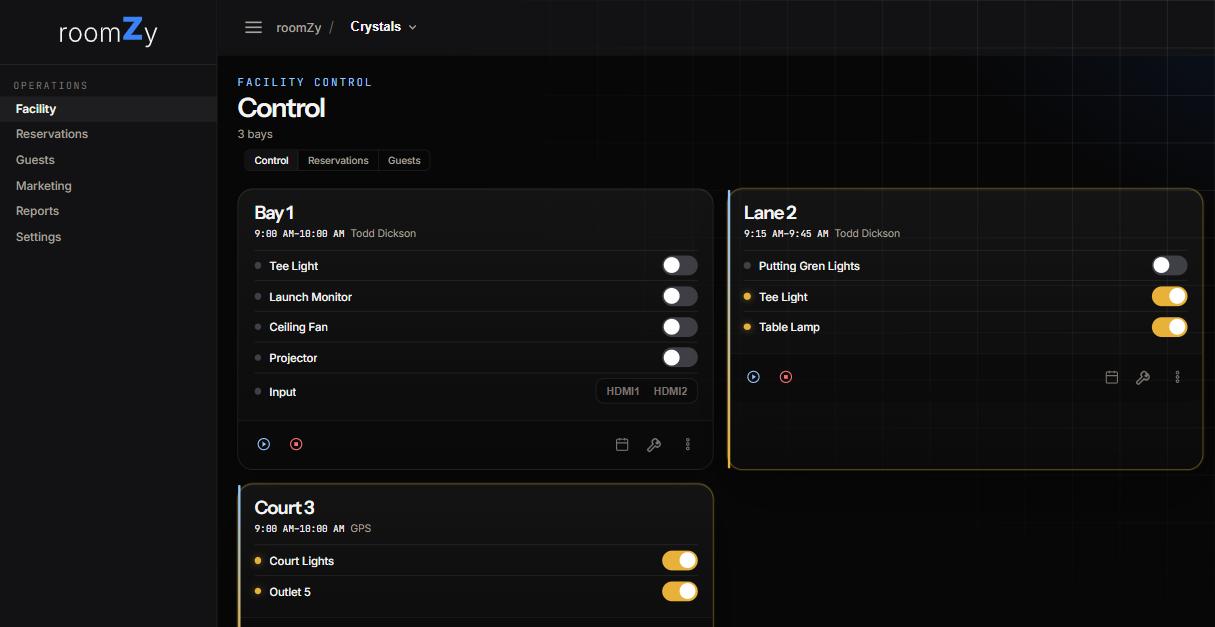
- Open Facility from the left menu — each bay is a card showing its current booking and its equipment.
- Press the ▶ start button on the bay's card. roomZy runs that bay's start sequence — typically power, PC wake, projector on, lights.
- The card lights up (a gold outline) to show it's running. Press ⏹ stop to run the shutdown sequence.
You can also flip individual equipment — Tee Light, Launch Monitor, Projector, HDMI input — with the per-row toggles, without starting the whole bay.
Starting a bay directly is best for "they're here, put them on bay 3 now." To put it on the calendar or tie it to a guest, make a reservation instead — see Creating a reservation.
Let roomZy do it — auto-start & auto-stop
Around reservations
- Auto-start powers a booked bay up shortly before the start time, so it's ready when the player walks in.
- Auto-stop shuts it down at the booked end. With the Concierge on, the bay asks the player whether they'd like more time first; a tap extends the booking, and a booking coming up next always forces a clean hand-off.
- On a reservation you can disable auto-start or auto-stop if you'd rather run that booking by hand (instructional or maintenance).
The timing lives in Settings → Hours & booking (Automatic start & stop). The on-screen Concierge, switched on under Settings → Concierge, can offer a player more time before auto-stop — see Installing the Concierge.
Lights & outlets
If the venue has smart lighting or plugs, you can toggle them from the same screen. Critical power (launch monitors, projectors) runs on roomZy-managed distribution so it can't be switched off by accident.