Managing your guests
Every booking builds your guest list. The Guests screen is where you look someone up, fix their details, see their history, and manage any balances they hold.
Finding a guest
Open Guests from the left menu. Search by name, phone, or email — the count next to the box shows how many match. Each row shows visits and when they last came in. Need the whole list elsewhere? Export CSV (top right).
The guest record
Click a guest to open their record.
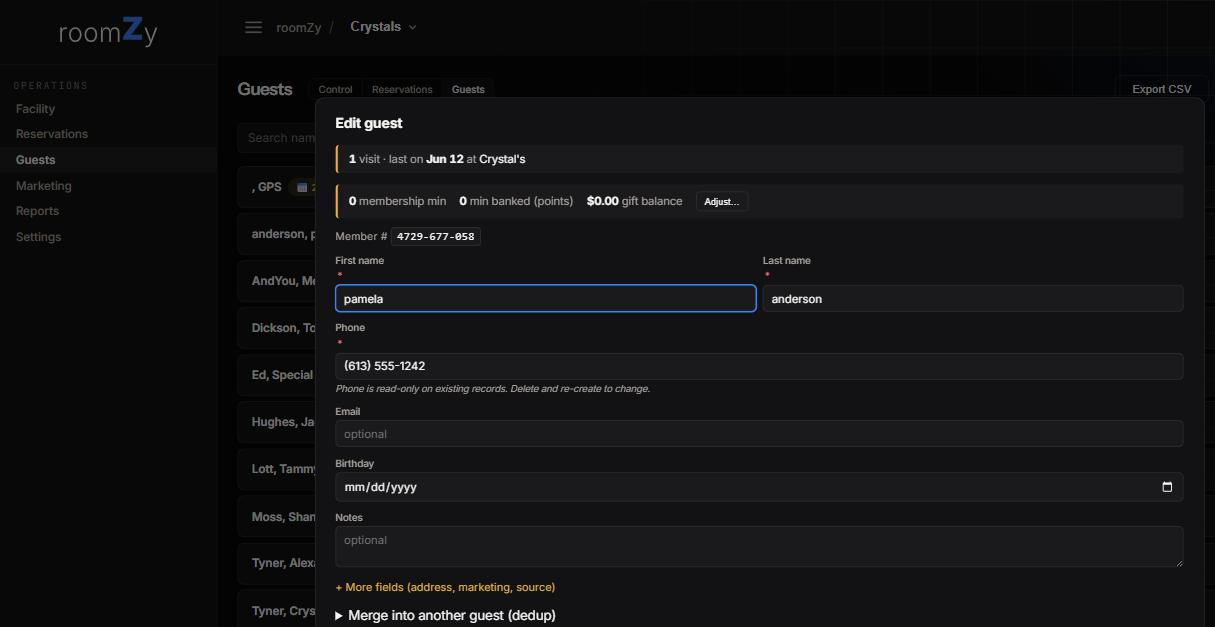
What's on the record
- History — visit count and last visit.
- Balances — membership minutes, banked points, and gift value, with Adjust for staff to correct them.
- Details — name, phone, email, birthday, and notes; + More fields adds address and marketing/source.
- A member number for your reference.
Launch-monitor accounts
If your venue runs Leagues, the guest record has a Launch-monitor accounts panel. Link a player's aboutGolf member here — their username and member number (the digits after the dash on a scorecard, e.g. TODDDICKSON-71003) — so every round they play finds their record on its own.
Why link it
- Do it once and league scores attribute to this guest automatically — no per-round matching.
- A linked guest shows a ⛳ on the guest list and on league rosters.
- The panel only appears for facilities with Leagues enabled. Full walkthrough: Running a league.
A couple of rules worth knowing
Phone & duplicates
- Phone is the identity and is read-only on an existing record — to change it, delete and re-create the guest. This is what links a returning guest to their history.
- Two records for the same person? Use Merge into another guest to combine them (history and balances fold together).
How guests get created
You don't have to add guests by hand — they're created automatically when someone books online or when staff make a reservation with a name. You can also bulk-import from a spreadsheet (ask us for the template).