Reading your Reports
Reports turns every session into a picture of how the venue is used — how busy you are, which bays earn their keep, and how much extra time players are buying at the bay.
Open Reports from the left menu.
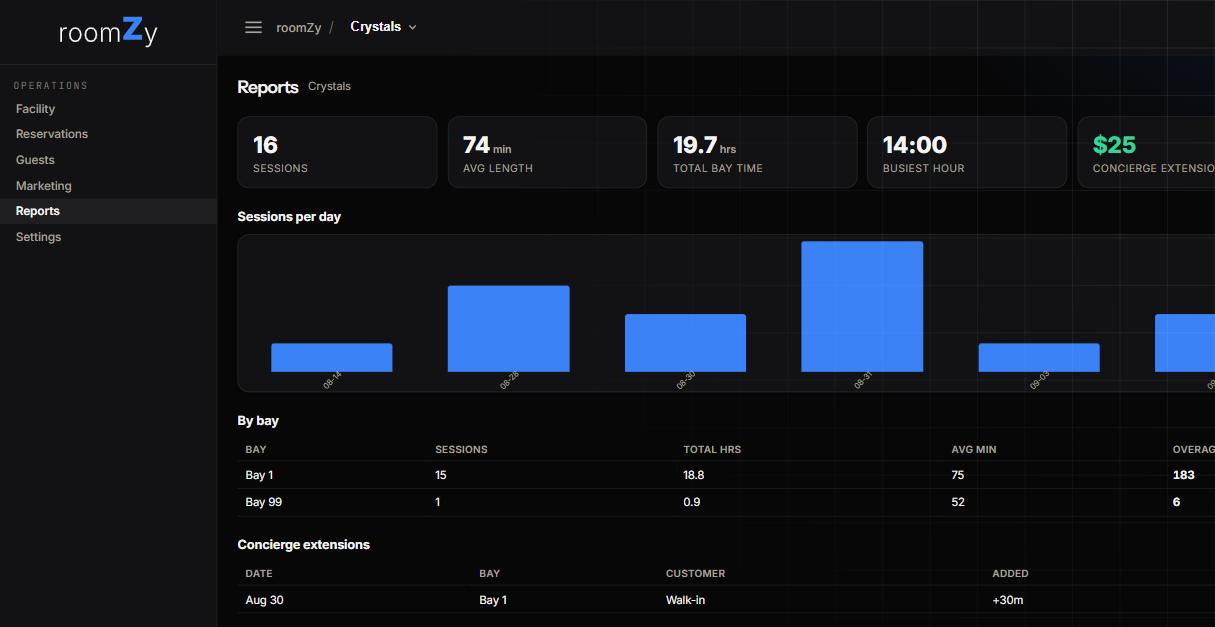
The headline numbers
At a glance
- Sessions — how many bay sessions ran in the period.
- Avg length — the typical session, in minutes.
- Total bay time — all sessions added up, in hours.
- Busiest hour — when demand peaks, so you can staff and price for it.
- Concierge extensions — the extra revenue from players adding time at the bay.
Sessions per day
The bar chart shows volume over the period — quick read on weekend-vs-weekday and whether a promotion moved the needle.
By bay
A table of sessions, total hours, average minutes, and overage for each bay. Use it to spot a bay that's under-booked (bad location? older sim?) or one that's always full (raise its price, or add another like it — see Pricing & bay types).
Concierge extensions
Each time a player accepted more time at the bay, listed with the date, bay, customer, and minutes added. This is the "invite them to stay" revenue the Concierge creates — the same number that flows to billing.
Good to know
- Reports counts actual sessions — a booking that never started the bay isn't a session.
- Seeded demo data is included while it's present; it clears when the demo is removed.