Concierge & Bay PCs
The Bay PCs screen is where you install the on-screen Concierge on each bay's computer and see which bays are live. It's self-serve — you can pair a bay and get its install command without waiting on us.
Where to find it
In the dashboard, open Settings → Concierge. The on/off switch is first, the Bay PCs card is right under it, and the adding-time, welcome and goodbye settings follow (see Concierge settings). (The logo and accent the popups use live under Profile & branding.)
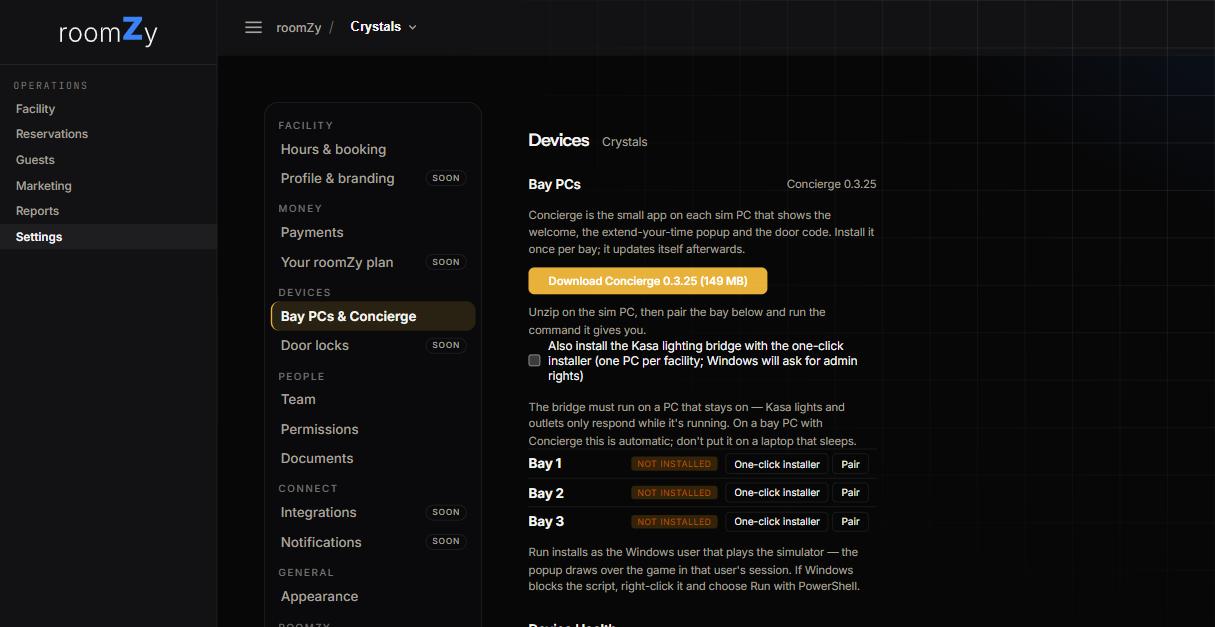
Installing on a bay
- On the bay's own PC, use One-click installer for that bay — it downloads a small script with the package and the bay's pairing baked in, then installs, pairs, and starts the Concierge.
- Prefer to do it by hand? Download the package, then use Pair to get the bay's token and command and run it in PowerShell.
- The bay's status turns to online · v… when it's live. It keeps itself up to date after that.
Run it as the Windows user that plays the simulator — the popup needs to draw over the game. Full walkthrough: Installing the Concierge.
Reading the status
Each bay shows
- online · v… — installed and connected, with its version.
- not installed — no Concierge on that bay yet.
- Buttons to Pair (manual route) and run the One-click installer.
Kasa lights and plugs?
Nothing to do with the Concierge — roomZy Edge drives them directly. Enter your Kasa login under Settings → Apps & devices. See Kasa lights and plugs.
Who can do this
Pairing and installing is available to owners, managers, and roomZy admins.